 By
By
Google AI Studio Custom URLs: The Complete 2026 Guide
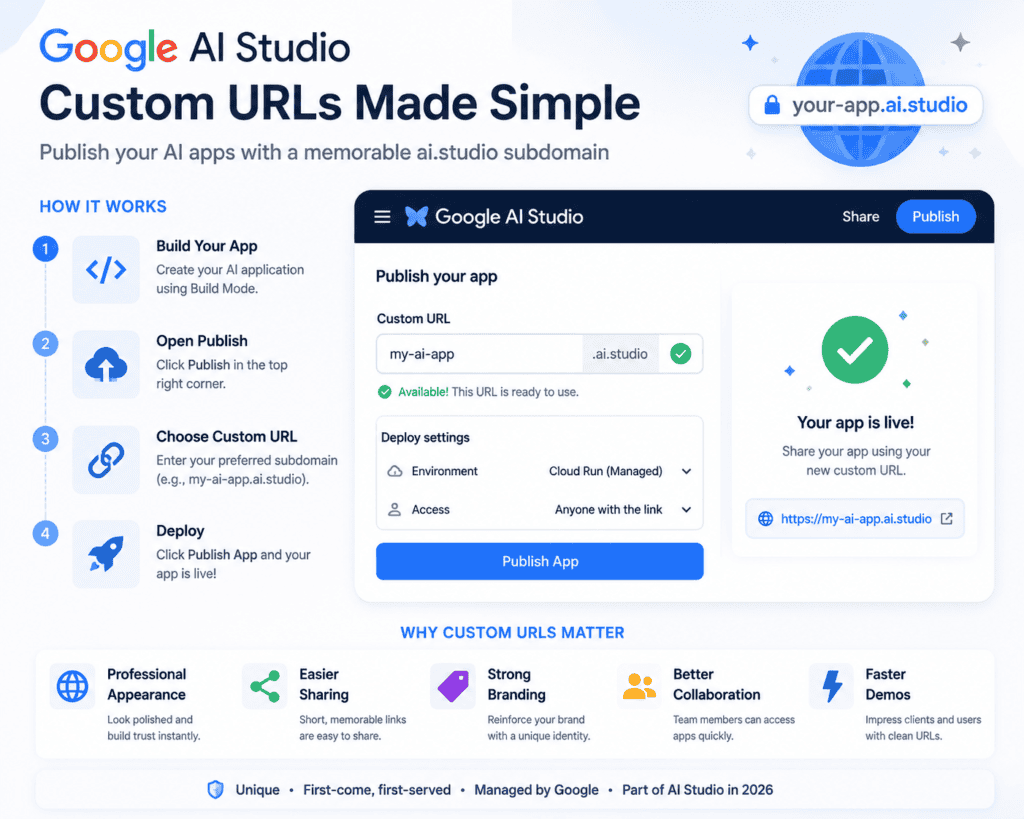
Google AI Studio Custom URLs allow developers to publish AI-powered applications with memorable your-app.ai.studio web addresses instead of long Cloud Run URLs. The feature simplifies app sharing, improves branding, and makes prototypes look more professional without requiring a custom domain. Google introduced this capability in 2026 as part of the expanding AI Studio Build Mode experience.
Whether you’re creating an AI chatbot, business assistant, educational tool, or internal company application, a clean URL is often the difference between a prototype that feels experimental and one that feels production-ready.
This guide explains everything you need to know—from setup and requirements to limitations, best practices, and future developments.
What Are Google AI Studio Custom URLs?
Google AI Studio Custom URLs are personalized subdomains hosted under the ai.studio domain.
Instead of receiving a deployment URL such as:
https://service-12345-uc.a.run.appyou can publish your application as:
https://my-ai-app.ai.studioThe result is a shorter, easier-to-remember web address suitable for:
- Product demos
- Client presentations
- Portfolio projects
- Startup MVPs
- Team collaboration
- Hackathon submissions
Unlike purchasing your own domain, Google manages the hosting and infrastructure while assigning a unique ai.studio subdomain.
Why Google Introduced Custom URLs
As Google AI Studio evolved from a prompt playground into a full-stack application builder, developers needed professional deployment options.
Previously, applications were accessible only through Cloud Run URLs that were difficult to remember and looked unfinished.
Custom URLs solve several problems:
- Better branding
- Easier sharing
- Cleaner documentation
- More professional demonstrations
- Simpler collaboration
This change aligns AI Studio with modern no-code and AI development platforms that prioritize rapid deployment and user-friendly sharing.
How Google AI Studio Custom URLs Work
The feature is integrated directly into AI Studio’s publishing workflow.
Step 1 — Build Your Application
Create your application using Build Mode.
Supported projects include:
- AI chatbots
- Productivity tools
- Web applications
- Full-stack AI apps
- Android applications
Step 2 — Open Publish
Click Publish in the upper-right corner.
AI Studio opens deployment settings.
Step 3 — Choose a Custom URL
Enter your preferred subdomain.
Example:
project-name.ai.studioIf available, Google reserves it immediately.
If unavailable, you’ll be asked to choose another name.
Step 4 — Deploy
Select Publish App.
After deployment completes, your application becomes accessible through the custom ai.studio address.
Custom URL Requirements
Google enforces several rules.
| Requirement | Details |
|---|---|
| Must be unique | No duplicate names allowed |
| First-come basis | Names cannot be reserved |
| ai.studio only | No external domains |
| Active deployment | URL belongs to deployed app |
| Terms compliance | Trademark violations prohibited |
Can You Change Your Custom URL?
Yes.
However, there are important limitations.
If you wish to move a URL to another application:
- Unpublish the existing app.
- Delete or release the URL.
- Republish the new application.
- Reclaim the same subdomain.
There is a risk that another developer could register the released URL before you do.
Google AI Studio Starter Tier
Many developers use AI Studio through Google’s Starter Tier.
Benefits include:
- No Cloud billing required initially
- Up to two deployed applications
- Managed Cloud Run deployment
- Automatic infrastructure
- Fast publishing
This makes custom URLs particularly valuable for prototypes and demos.
Benefits of Google AI Studio Custom URLs
Professional Appearance
A memorable URL immediately increases trust.
Example:
invoice-helper.ai.studiolooks far more polished than a random Cloud Run address.
Easier Sharing
Developers can quickly send links through:
- Slack
- Teams
- X (Twitter)
- Product Hunt
Improved Branding
A recognizable name reinforces your project’s identity.
Better Demonstrations
For conferences, hackathons, or client meetings, clean URLs are easier to present and remember.
Faster Collaboration
Team members can access shared applications without bookmarking complex deployment links.
Best Practices for Choosing a Custom URL
Choose names that are:
✅ Short
✅ Memorable
✅ Brandable
✅ Easy to pronounce
Examples:
studybot.ai.studio

legalassistant.ai.studio

travelplanner.ai.studio

salescopilot.ai.studio
Avoid:
- Random numbers
- Long phrases
- Special characters
- Trademarked company names
Common Mistakes
Many developers make avoidable errors.
Choosing generic names
Popular names disappear quickly.
Waiting too long
URLs are assigned on a first-come, first-served basis.
Ignoring branding
Your URL becomes part of your product identity.
Forgetting trademark rules
Google may remove URLs that violate intellectual property policies.
Google AI Studio Custom URLs vs Cloud Run URLs
| Feature | AI Studio Custom URL | Cloud Run URL |
|---|---|---|
| Easy to remember | ✅ | ❌ |
| Professional | ✅ | Limited |
| Branding | Strong | Weak |
| Automatic setup | ✅ | Yes |
| Uses ai.studio domain | ✅ | No |
| Google managed | ✅ | ✅ |
Security Considerations
Google AI Studio deployments continue to use secure backend infrastructure.
Key security practices include:
- Server-side API keys
- Cloud Run hosting
- Secure deployment pipeline
- Managed infrastructure
- Authentication support
- Firebase integration
Developers should still avoid exposing sensitive credentials in frontend code.
Practical Example
Imagine you’re building an AI customer support assistant.
Without custom URLs:
https://support-demo-abc123.a.run.appWith Google AI Studio:
supportbot.ai.studioThe second option is easier for customers to remember, looks more professional in presentations, and improves confidence during product demos.
Troubleshooting
URL unavailable
Another user has already claimed it.
Try:
- Adding your brand
- Using a location
- Including your product name
Cannot transfer URL
Unpublish the original application before assigning the URL elsewhere.
App not loading
Verify:
- Deployment completed successfully
- Build errors are resolved
- Sharing permissions are configured correctly
Expert Analysis
Custom URLs may seem like a small enhancement, but they significantly improve the presentation of AI applications. They reduce friction when sharing projects, help establish recognizable identities, and make prototypes feel closer to production-ready products. For startups, freelancers, educators, and hackathon teams, this feature removes one of the last usability gaps between an experimental AI app and a polished public demo.
Future Outlook
Google AI Studio continues to evolve beyond a prompt-testing environment into a comprehensive AI application platform. Recent updates have added GitHub import, Workspace integrations, Android app generation, and Build Mode improvements. Custom URLs fit into this broader strategy by making deployed applications easier to share and manage. Future enhancements may include support for custom domains, advanced deployment controls, and richer collaboration features as the platform matures.
Deployment Checklist
- Build your application
- Test all features
- Select a memorable subdomain
- Verify uniqueness
- Publish the application
- Test the public URL
- Share with users
- Monitor usage
- Update when needed
Key Takeaways
Google AI Studio Custom URLs provide developers with memorable ai.studio subdomains that replace long Cloud Run links. The feature simplifies sharing, strengthens branding, and gives AI-powered applications a more professional presence. Because subdomains are globally unique and allocated on a first-come, first-served basis, choosing and publishing your preferred name early is recommended. Combined with AI Studio’s Build Mode and managed deployment options, Custom URLs make it easier to move from prototype to a publicly accessible application with minimal setup.
Frequently Asked Questions
What is Google AI Studio Custom URL?
It is a personalized your-app.ai.studio subdomain assigned to applications deployed from Google AI Studio.
Are Custom URLs free?
They are available for eligible AI Studio deployments, including Starter Tier deployments, subject to Google’s current limits and eligibility requirements.
Can two apps use the same URL?
No. Every ai.studio subdomain must be globally unique.
Can I use my own domain?
Currently, AI Studio Custom URLs are provided under the ai.studio domain. Native support for custom external domains has not been announced.
Can I rename my URL later?
Yes, but transferring a URL requires unpublishing the current application that owns it before reassigning the subdomain.
Do Custom URLs improve SEO?
The URL itself does not guarantee higher rankings, but short, descriptive URLs can improve usability, sharing, and brand recognition, which may indirectly benefit discoverability.
Are API keys exposed through deployed apps?
No. AI Studio stores Gemini API keys as server-side secrets and does not expose them in client-side code.
[…] Read Also: Google AI Studio Custom URLs: Complete 2026 Guide to Custom AI.Studio Domains […]