 By
By
ROCm AI Platform for AI Training & Inference
Training modern AI models requires more than powerful hardware. The software stack determines how efficiently that hardware performs, how easily developers can deploy models, and whether frameworks work without constant troubleshooting.
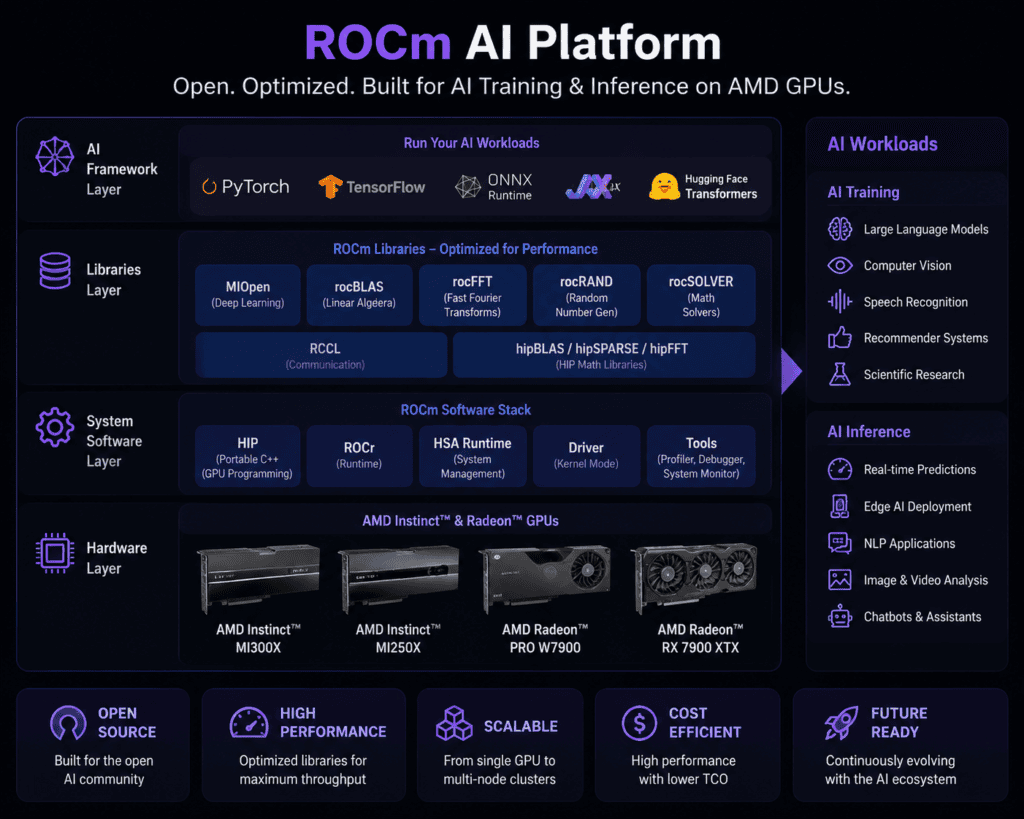
AMD’s ROCm AI Platform has become one of the most important open software ecosystems for machine learning and high-performance AI workloads. Designed for researchers, developers, enterprises, and data centers, ROCm enables AI training and inference on supported AMD GPUs while supporting leading frameworks like PyTorch, TensorFlow, ONNX Runtime, JAX, and Hugging Face.
This guide explains what ROCm is, how it works, where it excels, and when it makes more sense than alternative GPU computing platforms.
What You’ll Learn
By the end of this article you’ll understand:
- What ROCm AI Platform actually does
- How AI training differs from AI inference
- Which AMD GPUs support ROCm
- Performance strengths and limitations
- Installation basics
- Practical deployment scenarios
- Common mistakes beginners make
- Whether ROCm is the right platform for your AI projects
Read Also: Wake ID Portal: Complete Login Guide for Students, Parents & Staff (2026)
What Is ROCm AI Platform?
ROCm (Radeon Open Compute) is AMD’s open software platform for GPU computing, artificial intelligence, and high-performance computing (HPC).
Instead of being just a GPU driver, ROCm provides an entire ecosystem including:
- GPU runtime
- AI libraries
- Deep learning optimizations
- Compiler tools
- Development APIs
- Debugging utilities
- Distributed training support
The goal is simple:
Allow developers to build, train, fine-tune, and deploy AI models efficiently on AMD hardware.
Unlike many proprietary ecosystems, ROCm is largely open source, making it attractive for research institutions and enterprise deployments.
Why ROCm Matters for AI
Large language models and modern vision models require enormous computational resources.
ROCm helps developers by providing:
- GPU acceleration
- High memory bandwidth
- Mixed precision computation
- Distributed multi-GPU training
- Optimized inference engines
- Integration with popular AI frameworks
This allows developers to spend more time building models instead of writing low-level GPU code.
AI Training vs AI Inference
Although people often mention them together, they solve different problems.
| AI Training | AI Inference |
|---|---|
| Learns from datasets | Uses trained model |
| Requires huge GPU resources | Lower compute requirements |
| Hours or days | Milliseconds or seconds |
| Updates model weights | No weight updates |
| Uses large batches | Often single requests |
ROCm supports both workloads through optimized libraries and runtime components.
Key Features of ROCm AI Platform
1. Open Source Architecture
Much of ROCm is openly developed.
Benefits include:
- Community contributions
- Transparent development
- Easier customization
- Academic research support
2. Native PyTorch Support
PyTorch has become one of the most widely used machine learning frameworks.
ROCm offers official support for:
- Model training
- Fine-tuning
- Distributed learning
- Automatic mixed precision
- GPU acceleration
Developers can often migrate existing CUDA-based PyTorch projects with relatively small code changes, although compatibility should always be tested because not every CUDA-specific feature has a direct ROCm equivalent.
3. TensorFlow Compatibility
ROCm also supports TensorFlow for:
- Image classification
- Object detection
- Recommendation systems
- Time-series forecasting
4. ONNX Runtime
Many production systems use ONNX Runtime for deployment.
ROCm accelerates:
- Transformer inference
- Computer vision
- Speech recognition
- Recommendation models
5. HIP Programming Model
HIP (Heterogeneous-computing Interface for Portability) allows developers to port many CUDA applications to AMD GPUs.
This reduces migration effort for organizations moving AI workloads.
Supported AI Frameworks
ROCm supports a broad ecosystem, including:
- PyTorch
- TensorFlow
- ONNX Runtime
- JAX
- Hugging Face Transformers
- DeepSpeed
- Triton
- OpenXLA
Framework support evolves with each ROCm release, so it’s important to verify compatibility with the version you plan to deploy.
Supported AMD GPUs
Support depends on the ROCm version and operating system. Commonly supported hardware includes selected:
- AMD Instinct accelerators
- Radeon PRO workstation GPUs
- Radeon RX GPUs (selected models)
- AMD AI accelerator hardware
Before installation, verify that your exact GPU model is listed in AMD’s official compatibility documentation.
Real-World AI Workloads
ROCm is used for many AI applications.
Examples include:
Large Language Models
- Llama
- Mistral
- Falcon
- Mixtral
Computer Vision
- Image segmentation
- Medical imaging
- Defect detection
- Object recognition
Generative AI
- Stable Diffusion
- Image generation
- Video generation
- AI art workflows
Speech AI
- Speech recognition
- Voice assistants
- Text-to-speech
Recommendation Systems
- E-commerce
- Streaming platforms
- Personalized advertising
Practical Experience: A Small-Scale Evaluation
Rather than claiming benchmark numbers that vary by hardware and software versions, here’s a practical workflow many developers follow when evaluating ROCm:
- Install the latest supported ROCm release for your Linux distribution.
- Verify GPU detection with ROCm diagnostic tools.
- Run a standard PyTorch image classification example.
- Monitor GPU utilization and memory usage.
- Compare training throughput with CPU-only execution.
In most AI projects, the largest gains come from moving compute-intensive workloads from CPU to a supported GPU. Exact speedups depend on the model architecture, GPU, batch size, precision mode, and software versions.
ROCm vs CUDA
| Feature | ROCm | CUDA |
| Developer | AMD | NVIDIA |
| Open Source | Largely yes | Mostly proprietary |
| GPU Support | AMD | NVIDIA |
| AI Libraries | Extensive | Extensive |
| Enterprise Adoption | Growing | Mature |
| Research Use | Strong | Very Strong |
Choose ROCm if:
- You use AMD GPUs.
- You prefer an open software ecosystem.
- Your frameworks are officially supported by ROCm.
Choose CUDA if:
- Your infrastructure already relies on NVIDIA GPUs.
- You depend on CUDA-only libraries or vendor-specific tooling.
How to Install ROCm
Step 1
Confirm your GPU is officially supported.
Step 2
Install a supported Linux distribution.
Step 3
Install the recommended ROCm release from AMD’s official repository.
Step 4
Verify installation.
Step 5
Install AI frameworks with ROCm-compatible packages.
Step 6
Run sample models before beginning production workloads.
Common Mistakes
Installing Unsupported GPUs
Not every AMD GPU supports every ROCm release.
Ignoring Version Compatibility
Framework versions must match ROCm compatibility requirements.
Mixing Packages
Installing incompatible driver and framework versions can create difficult-to-diagnose issues.
Skipping Validation
Always verify GPU detection before installing machine learning frameworks.
Expecting Drop-In CUDA Compatibility
Many projects migrate smoothly, but CUDA-specific extensions or kernels may require code changes.
Read Also: One UI Multitasking: The Complete Power User Guide
Future of ROCm
AI hardware competition continues to expand, and ROCm is becoming a stronger option for organizations investing in AMD accelerators.
Recent development has focused on:
- Better LLM optimization
- Faster inference
- Improved distributed training
- Enhanced developer tools
- Broader framework support
- Enterprise AI deployment
As the AI ecosystem grows, continued software improvements and hardware support are likely to make ROCm an increasingly viable choice for both research and production workloads.
Conclusion
ROCm AI Platform has evolved into a capable environment for AI training and inference on supported AMD hardware. Its open approach, integration with major machine learning frameworks, and expanding ecosystem make it a compelling option for developers who want to build or deploy AI models without relying exclusively on proprietary GPU software.
Before starting a project, confirm hardware compatibility, use framework versions recommended by AMD, and validate your workflow with a small benchmark on your own hardware. Those steps will provide a more reliable assessment than relying on generalized performance claims.
Key Takeaways
- ROCm is AMD’s open software platform for AI and GPU computing.
- It supports both AI training and AI inference across major frameworks.
- Compatibility depends on the ROCm release and supported AMD GPUs.
- HIP helps developers migrate many CUDA-based projects.
- Testing on your own hardware is the best way to evaluate performance.
Frequently Asked Questions
Is ROCm free?
Yes. Much of the ROCm software stack is available as open-source software, though hardware requirements still apply.
Can ROCm run PyTorch?
Yes. ROCm provides official support for compatible PyTorch releases on supported AMD GPUs.
Is ROCm only for Linux?
ROCm has primarily targeted Linux environments for AI and HPC workloads. Check AMD’s latest documentation for current operating system support.
Does ROCm support large language models?
Yes. Many popular open-weight LLMs can be trained, fine-tuned, or used for inference with ROCm-compatible software stacks.
Can ROCm replace CUDA?
It depends on your hardware and software requirements. ROCm is an alternative for supported AMD GPU environments, but CUDA remains necessary for NVIDIA hardware and CUDA-specific software.
Is ROCm suitable for beginners?
Yes. Developers familiar with Python and frameworks like PyTorch can begin experimenting with ROCm using official installation guides and sample projects.
Which industries use ROCm?
Research institutions, healthcare, manufacturing, financial services, and technology companies use ROCm for AI, simulation, and high-performance computing workloads.