
 By
By
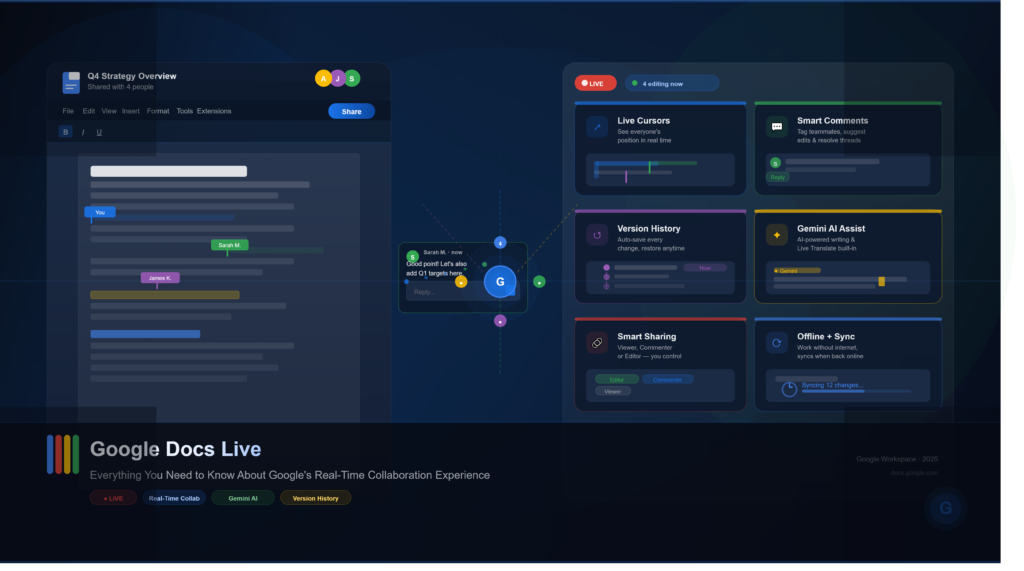
Google Docs Live: A Smarter Way to Collaborate in Real Time
Remote work has transformed how people create, edit, and share documents. Traditional file-sharing methods often lead to multiple versions, confusing feedback, and unnecessary delays. Modern teams expect documents to behave like collaborative workspaces rather than static files.
Google Docs Live is Google’s answer to that expectation.
Instead of treating a document as something one person edits at a time, Google Docs Live emphasizes simultaneous collaboration, instant communication, and AI-assisted productivity. Multiple contributors can brainstorm, edit, comment, and refine content together without interrupting each other’s workflow.
Whether you’re writing a business proposal, preparing academic research, planning marketing campaigns, or managing project documentation, Google Docs Live makes collaboration feel almost effortless.
This guide explains how Google Docs Live works, its standout features, practical use cases, advantages over traditional document editing, and how it fits into Google’s growing AI-powered productivity ecosystem.
What Is Google Docs Live?
Google Docs Live refers to Google’s enhanced real-time collaborative document experience that combines live editing, instant synchronization, AI-powered assistance, and integrated communication tools into a single workspace.
Unlike conventional word processors where documents are shared after editing, Google Docs Live enables everyone with permission to contribute simultaneously. Every keystroke, comment, and suggestion appears almost instantly, making collaboration faster and more transparent.
The platform is tightly integrated with Google Workspace, allowing users to work seamlessly with Gmail, Google Drive, Google Meet, Google Calendar, and Gemini AI.
Why Google Docs Live Matters
Businesses and educational institutions increasingly rely on distributed teams. Waiting for document revisions through email attachments is inefficient and prone to errors.
Google Docs Live solves several common collaboration challenges:
- Real-time editing without file conflicts
- Automatic cloud saving
- Version history and document recovery
- Live comments and suggestions
- AI-powered writing assistance
- Easy sharing with customizable permissions
- Cross-device accessibility
The result is a smoother workflow where everyone works on the same document instead of juggling multiple copies.
Key Features of Google Docs Live
1. Real-Time Collaborative Editing
Perhaps the most recognizable feature is simultaneous editing.
Multiple users can type, format, edit, and reorganize content at the same time. Colored cursors show who is working where, reducing overlap and making teamwork more intuitive.
Changes appear instantly without refreshing the page.
2. Live Comments and Suggestions
Instead of editing someone else’s work directly, collaborators can leave contextual comments or switch to Suggesting Mode.
This allows teams to:
- review documents
- recommend edits
- ask questions
- approve changes
- resolve discussions
Every conversation remains attached to the relevant section of the document.
3. Version History
Mistakes happen.
Google Docs automatically records previous versions, allowing users to:
- restore earlier drafts
- compare revisions
- identify contributors
- track project progress
This feature is particularly useful for long-term collaborative projects.
4. Gemini AI Integration
One of the biggest improvements is Google’s AI integration.
Gemini can help users:
- draft content
- summarize lengthy documents
- rewrite paragraphs
- improve grammar
- adjust tone
- brainstorm ideas
- generate outlines
Rather than replacing writers, AI acts as an intelligent assistant that speeds up content creation while leaving final decisions to the user.
5. Smart Sharing Controls
Google Docs Live offers flexible permission settings.
Document owners can choose whether recipients can:
- view
- comment
- edit
Permissions can be updated at any time, making it suitable for both internal collaboration and external client reviews.
How Google Docs Live Works
The experience revolves around cloud-based collaboration.
A document is stored in Google Drive rather than on a local computer. Every edit is synchronized almost instantly across all connected devices.
Here’s a typical workflow:
- Create a document.
- Share it with teammates.
- Assign editing permissions.
- Collaborate simultaneously.
- Discuss revisions using comments.
- Let Gemini assist with writing tasks.
- Finalize and export the document when complete.
This streamlined process eliminates the need for endless email attachments and duplicate document versions.
Benefits for Different Users
Students
Students can collaborate on group assignments, research papers, presentations, and shared notes without worrying about conflicting document versions.
Businesses
Companies use Google Docs Live for meeting notes, project planning, proposals, policy documentation, and collaborative reporting.
Content Creators
Writers, editors, and marketers benefit from real-time feedback, AI-powered drafting, and collaborative editing throughout the publishing process.
Remote Teams
Distributed teams working across different time zones can contribute whenever convenient while maintaining a single source of truth.
Google Docs Live vs Traditional Word Processors
| Feature | Google Docs Live | Traditional Offline Documents |
|---|---|---|
| Real-time collaboration | Yes | Limited |
| Automatic saving | Yes | Usually manual |
| Cloud storage | Built-in | Optional |
| AI writing assistance | Yes | Varies |
| Version history | Automatic | Often limited |
| Browser access | Yes | Software installation required |
| Multi-device synchronization | Yes | Limited |
Practical Example
Imagine a marketing agency preparing a product launch campaign.
The content writer drafts the announcement while the SEO specialist optimizes headings, the designer inserts graphics, the project manager leaves comments, and the client reviews the document—all at the same time.
Instead of sending ten different versions through email, everyone works inside one shared document with complete visibility into every change.
That collaborative efficiency is the core value of Google Docs Live.
Best Practices
To get the most from Google Docs Live:
- Organize documents in shared folders.
- Use clear headings for easier navigation.
- Enable Suggesting Mode during reviews.
- Resolve comments once decisions are made.
- Review version history before major edits.
- Use Gemini for brainstorming, but always verify AI-generated content.
- Limit editing permissions to trusted collaborators.
Google Docs Live combines cloud collaboration, intelligent automation, and seamless teamwork into a single productivity platform. For organizations, educators, students, and creators alike, it reduces friction, speeds up workflows, and makes collaborative writing significantly more efficient.