 By
By
InSnoop: Anonymous Instagram Story Viewer Guide (2026)
Introduction
Instagram Stories are designed to show creators who viewed their content. That visibility is useful for engagement, but it can also make casual browsing feel less private. This is where InSnoop enters the conversation.
InSnoop is a browser-based tool that says it allows users to view Instagram Stories and Highlights from public profiles without logging into Instagram or appearing in the account owner’s Story viewer list. It also promotes media-viewing and download features.
The appeal is simple: enter a public Instagram username, search for available content, and view it through a third-party website rather than through your own Instagram account.
Still, anonymous viewing tools raise important questions:
- Does InSnoop really keep viewers anonymous?
- Can it access private Instagram accounts?
- Is it safe to use?
- Does it require an Instagram password?
- Are downloaded Stories legal to reuse?
- What should users check before trusting a third-party viewer?
This guide explains how InSnoop works, where its limitations begin, and how to use anonymous Instagram viewers more carefully.
Read Also: Evonygalore Alternatives: Best Gaming News & Strategy Sites (2026)
What Is InSnoop?
InSnoop is a web-based Instagram Story viewer that claims to let users anonymously view and download Stories and Highlights from public Instagram profiles without signing into Instagram.
The service is designed to work through a browser. Users generally enter an Instagram username or public profile link into a search field. If the requested content is publicly accessible and available through the service, InSnoop displays it on its own interface.
Quick Answer
InSnoop is an anonymous Instagram Story viewer for public accounts. It does not claim to bypass private-account privacy settings, and users should avoid entering Instagram passwords into third-party services.
InSnoop is not an official Instagram feature. It is an independent third-party tool and should not be confused with Instagram’s own Story viewing system.
How Does InSnoop Work?
InSnoop appears to act as an intermediary between users and publicly available Instagram content.
When a person views a Story directly through Instagram while logged in, Instagram can associate that view with the person’s account. InSnoop’s stated model is different: the user searches through InSnoop rather than opening the Story through their own Instagram session.
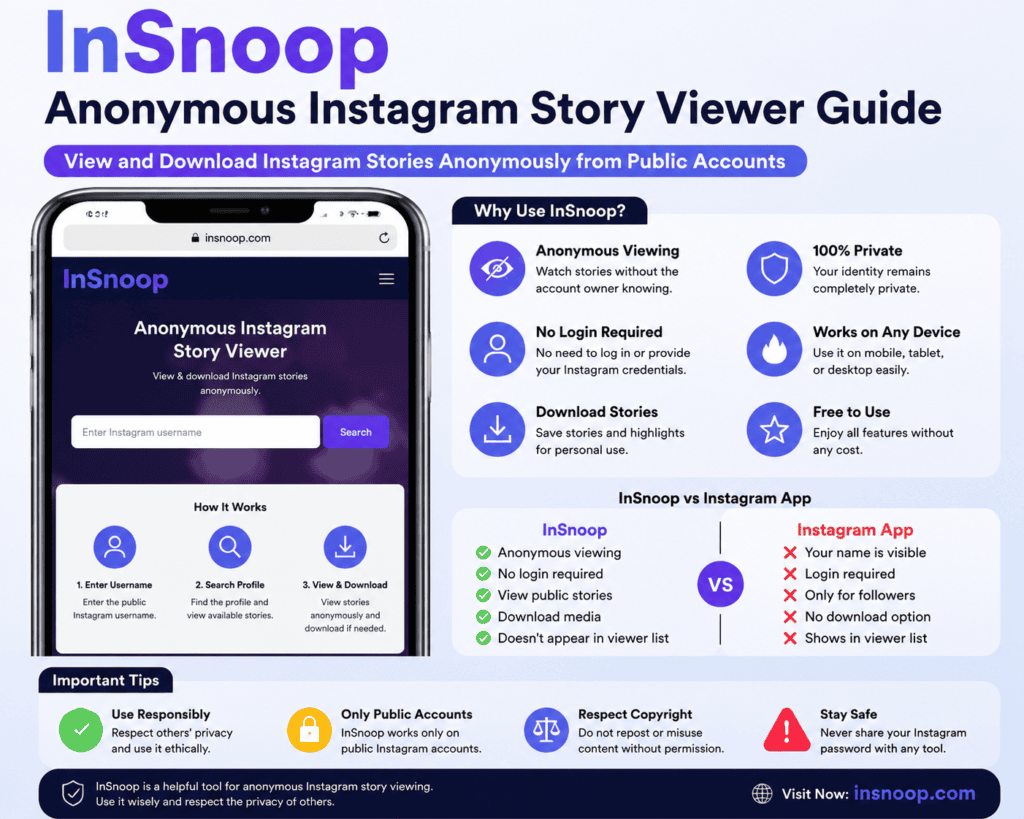
The general process is:
- Open the InSnoop website.
- Enter the username of a public Instagram account.
- Select or search for the profile.
- View available Stories or Highlights.
- Use the available media options if downloads are supported.
InSnoop says users do not need to create an account or log in with Instagram credentials.
Why This May Prevent a Username From Appearing
If a viewer does not open the Story through their own logged-in Instagram account, their Instagram username may not be submitted as a normal Story view.
That does not mean the activity is invisible to every system. A third-party website may still collect technical information such as browser details, IP-related data, cookies, analytics information, or usage records depending on its privacy practices.
Anonymous on Instagram does not automatically mean anonymous everywhere.
What Can You View With InSnoop?
According to its public descriptions, InSnoop is primarily focused on content from public Instagram profiles.
Available content may include:
- Current Instagram Stories
- Instagram Highlights
- Public photos
- Public videos
- Downloadable Story media, where supported
The exact results may vary because Instagram content changes frequently and third-party services can experience temporary access problems.
Public Accounts
Public profiles are the main use case. Content published publicly may be accessible through an anonymous viewer if the service can retrieve it.
Private Accounts
InSnoop is not designed to unlock private Instagram accounts. Private profiles restrict access to approved followers, and third-party viewers should not be expected to bypass those protections.
Any website claiming it can reveal private Instagram Stories without approval deserves extra scrutiny, especially if it requests:
- An Instagram password
- Payment before showing results
- App installation
- Account verification
- Personal information
- Browser extensions
How to Use InSnoop
Using an anonymous Story viewer is generally straightforward.
Step 1: Find the Public Instagram Username
Open the public profile you want to check and copy its username.
For example:
example.creator
Use the username carefully. A spelling mistake may return the wrong profile or no result.
Step 2: Open InSnoop
Visit the InSnoop website through a modern browser.
Step 3: Enter the Username
Paste the username or profile link into the search field.
Avoid entering your Instagram password. A Story viewer that works without login should not need access to your Instagram credentials.
Step 4: Review the Available Content
If the profile is public and the content is available, InSnoop may display active Stories or Highlights.
Step 5: View or Download Carefully
If a download option appears, use it only for legitimate personal purposes. Downloading a public image does not automatically grant permission to republish, edit, monetize, or claim ownership of it.
Key InSnoop Features
| Feature | What It Means |
|---|---|
| Anonymous Story viewing | Views may not be connected to your Instagram username |
| No Instagram login | The service says users can search without signing in |
| Public profile support | Designed primarily for publicly accessible accounts |
| Story viewing | May display active public Stories |
| Highlights access | May show available public Highlights |
| Media downloads | May allow supported photos or videos to be saved |
| Browser-based access | No dedicated app may be required |
| Mobile compatibility | Can be used through a phone or tablet browser |
Feature availability can change without notice. Third-party Instagram viewers depend on technical access that may be affected by platform updates.
Is InSnoop Really Anonymous?
The answer depends on what “anonymous” means.
Anonymous to the Instagram Account Owner
If InSnoop retrieves public content without using your logged-in Instagram account, your username may not appear in the Story viewer list. That is the core privacy benefit promoted by the service.
Anonymous to InSnoop
This is a separate question.
The website may still receive information from your browser. Depending on its policies and technical setup, this could include:
- IP-related information
- Browser type
- Device information
- Cookies
- Search activity
- Analytics data
- Security logs
Users should review the service’s current privacy policy before relying on it for sensitive browsing.
Anonymous to Instagram
The answer may be less certain. A user’s personal Instagram identity may not be attached to the view when no Instagram login is used, but the service itself may interact with Instagram systems or public content through its own infrastructure.
For this reason, “anonymous” should be understood as not displaying your Instagram username to the Story owner, rather than guaranteeing complete online invisibility.
Is InSnoop Safe to Use?
InSnoop may be convenient, but safety should be evaluated separately from functionality.
A website can work correctly while still having privacy, security, advertising, or data-handling concerns.
Signs of a Safer Experience
Look for these conditions:
- No Instagram password is required
- No suspicious application download is requested
- The website uses HTTPS
- The privacy policy is accessible
- The service clearly explains what data it collects
- No unexpected browser permissions are requested
- Downloads do not contain unknown executable files
Warning Signs
Stop using the service if it asks for:
- Your Instagram password
- A two-factor authentication code
- Recovery codes
- Payment to unlock a private account
- Installation of an unknown APK or desktop application
- Permission to send notifications without a clear reason
- Access to unrelated accounts
A legitimate public-content viewer should not need control of your Instagram account.
InSnoop Privacy Risks
Anonymous Story viewers can reduce visibility to the account owner, but they may introduce another privacy relationship: the user is now interacting with a third-party website.
Potential risks include:
1. Data Collection
The service may collect technical or behavioral data. Check its privacy policy for details about retention, analytics, advertising, and third-party sharing.
2. Misleading Login Pages
Some copycat websites imitate popular tools. A fake page may ask users to enter Instagram credentials.
Always verify the website address before entering information.
3. Advertisements and Redirects
Free online tools may rely on advertisements. Avoid clicking misleading download buttons, pop-ups, or unrelated offers.
4. Uncertain Long-Term Availability
Third-party Instagram viewers can stop working when platform systems change. A tool that works today may become unavailable later.
5. Content Reuse Problems
Viewing public content and republishing it are different activities. Copyright, privacy, platform rules, and local laws may apply when content is copied or redistributed.
InSnoop vs Viewing Stories Directly on Instagram
| Factor | InSnoop | Instagram App |
|---|---|---|
| Instagram login | Usually not required | Usually required |
| Story viewer list | Your account may not appear | Your account is normally recorded |
| Private accounts | Not supported | Available only to approved followers |
| Official platform | No | Yes |
| Account security | No account connection should be needed | Protected through Instagram’s own system |
| Reliability | May change or fail | Usually more consistent |
| Interaction features | Limited | Full reactions, replies, sharing, and engagement |
| Privacy trade-off | Less visible to the creator | More direct and transparent |
The official Instagram app is generally the better choice for normal interaction. InSnoop may appeal to users who want to inspect public Stories without connecting the activity to their own Instagram profile.
Who Uses InSnoop?
Different users may have different reasons for using anonymous Story viewers.
Casual Viewers
Some people want to check public Stories without appearing in the viewer list.
Social Media Marketers
Marketers may review public competitor content to study:
- Campaign timing
- Product announcements
- Story formats
- Calls to action
- Promotional patterns
- Audience engagement strategies
Anonymous viewing should not replace ethical research or proper competitive analysis.
Content Creators
Creators may use public Stories for trend research, format inspiration, or content planning.
Inspiration is not permission to copy another creator’s work.
Journalists and Researchers
Public social media content can help researchers monitor public events, campaigns, or online trends. Professional users should document sources and follow applicable ethical and legal standards.
Practical Example: Competitor Story Research
Imagine a small online clothing store that wants to understand how competing brands use Instagram Stories.
A researcher could:
- List five public competitor accounts.
- Review their Story formats.
- Record posting frequency.
- Identify common calls to action.
- Note recurring product themes.
- Compare findings with the store’s own content strategy.
The useful output is not a collection of copied images. It is a structured understanding of public communication patterns.
A simple research table could include:
| Account | Story Type | Main Message | CTA | Useful Insight |
|---|---|---|---|---|
| Brand A | Product demo | New collection | Shop now | Short videos attract attention |
| Brand B | Customer review | Social proof | Learn more | Testimonials build trust |
| Brand C | Poll | Audience feedback | Vote | Interactive Stories encourage participation |
This approach turns anonymous viewing into research rather than passive monitoring.
Common InSnoop Problems and Fixes
The Username Cannot Be Found
Possible causes include:
- The username is misspelled
- The account changed its handle
- The profile was deleted
- The account is private
- The service cannot retrieve the profile temporarily
Try: Copy the username directly from Instagram and remove the @ symbol if necessary.
No Stories Are Available
Instagram Stories are temporary. A Story may have expired, been deleted, or not been published.
Try: Check whether the account currently has an active Story.
The Website Loads Slowly
Possible causes include:
- High traffic
- Browser cache issues
- Network problems
- Temporary service interruptions
Try: Refresh the page, use a private browser window, or return later.
Downloads Do Not Work
The feature may be temporarily unavailable or unsupported for a particular media item.
Try: Check the file type, available storage, and browser download permissions.
A Private Account Does Not Open
This is expected. Anonymous viewers should not be treated as tools for bypassing private-account controls.
Common Mistakes to Avoid
Mistake 1: Expecting Access to Private Profiles
Private accounts are intentionally restricted. A legitimate anonymous viewer should not promise unrestricted access.
Mistake 2: Entering Instagram Credentials
If a tool claims to work without login, do not provide your username, password, authentication code, or recovery information.
Mistake 3: Assuming “Anonymous” Means Zero Data Collection
Your Instagram identity may be hidden from the Story owner while the third-party website still processes technical data.
Mistake 4: Downloading Content Without Considering Rights
Public availability does not automatically mean unrestricted reuse.
Mistake 5: Using Anonymous Tools for Harassment
Repeated monitoring, stalking, harassment, or misuse of personal content can create ethical and legal concerns.
Mistake 6: Trusting Clone Websites
Check the domain carefully. Similar names can be used to imitate popular tools.
Best Practices for Using InSnoop
Use this checklist before searching:
- Confirm that the Instagram profile is public
- Check the website address carefully
- Avoid entering Instagram credentials
- Review the privacy policy
- Avoid suspicious pop-ups and redirects
- Do not install unknown applications
- Use a current browser
- Keep downloads limited to legitimate purposes
- Do not republish content without permission
- Respect privacy and platform rules
InSnoop Alternatives
Several browser-based services offer similar anonymous viewing features. Features, privacy practices, reliability, and advertising models vary.
Examples include:
- DolphinRadar
- AnonyIG
- InsMask
- Other public Instagram Story viewers
These services generally focus on viewing public Stories without using the visitor’s own Instagram account.
When comparing alternatives, evaluate:
| Evaluation Factor | Why It Matters |
|---|---|
| Login requirement | Avoid unnecessary account access |
| Public-account limitation | Indicates whether privacy boundaries are respected |
| Privacy policy | Explains data handling |
| Advertising level | Reduces misleading-click risk |
| Download support | Useful for legitimate archiving |
| Device compatibility | Helps mobile and desktop users |
| Website reputation | May reveal recurring user concerns |
| Transparency | Shows how clearly the service explains its operation |
Do not choose a tool only because it claims to unlock private accounts. Such claims can be misleading or security risks.
Legal and Ethical Considerations
Viewing publicly available content is different from obtaining rights to use it.
Users should consider:
- Copyright ownership
- Creator permissions
- Privacy expectations
- Platform terms
- Local laws
- Commercial use restrictions
Downloading a Story for personal reference may be different from reposting it on a business page or using it in advertising.
For commercial work, request permission from the original creator when appropriate.
Ethical use also means avoiding:
- Harassment
- Stalking
- Impersonation
- Unauthorized redistribution
- Misleading content reuse
- Attempts to bypass private-account protections
Read Also: Play Hop: The Complete Guide to Gameplay, Features, Safety & Best Alternatives (2026)
The Future of Anonymous Instagram Viewers
Anonymous social media tools will likely continue to change as platforms strengthen privacy controls and update their technical systems.
Possible trends include:
Stronger Platform Restrictions
Instagram may change how public content is accessed, making some third-party tools less reliable.
Greater Privacy Transparency
Users increasingly expect clear explanations about cookies, analytics, tracking, and data retention.
More Research Features
Anonymous viewers may add tools for public trend tracking, content categorization, and competitor monitoring.
Better Mobile Experiences
Browser-based services may become more responsive across phones and tablets.
Increased Security Scrutiny
Users may become more cautious about third-party services that request credentials or excessive permissions.
The most sustainable tools will likely be those that respect public/private boundaries and explain their data practices clearly.
Conclusion
InSnoop is a browser-based tool that promotes anonymous viewing of Stories and Highlights from public Instagram profiles. Its main appeal is that users can search for public content without logging into Instagram or exposing their own account in the usual Story viewer list.
Its limitations matter just as much as its features. InSnoop is not a private Instagram account viewer, and anonymous viewing should not be confused with complete online anonymity.
The safest approach is straightforward:
- Use only public-profile tools
- Never provide Instagram passwords
- Review privacy practices
- Avoid suspicious downloads
- Respect creators’ rights
- Do not use anonymous browsing to harass or invade privacy
For ordinary Instagram interaction, the official app remains the most reliable option. InSnoop is better understood as a public-content viewing tool with privacy trade-offs—not as a way to bypass Instagram’s privacy system.
Frequently Asked Questions
1. What is InSnoop?
InSnoop is a browser-based service that says it allows users to view and download Stories and Highlights from public Instagram profiles without logging into Instagram.
2. Can someone see that I viewed their Story through InSnoop?
InSnoop states that users can view public Stories without appearing in the profile owner’s normal Instagram Story viewer list.
3. Does InSnoop work with private Instagram accounts?
No. Private accounts are protected by Instagram’s access controls and are not intended to be accessible through anonymous public-content viewers.
4. Do I need an Instagram account to use InSnoop?
InSnoop says that users do not need an Instagram account or login to search for supported public content.
5. Is InSnoop free?
The service presents itself as a free online Story viewer. Features and availability may change over time.
6. Is InSnoop safe?
Safety depends on the current website, its privacy practices, and how it is used. Do not enter Instagram credentials, install unknown software, or grant unnecessary permissions.
7. Can I download Instagram Stories using InSnoop?
InSnoop advertises media download capabilities for supported public content.
8. Does InSnoop work on mobile?
As a browser-based tool, it is intended to work on smartphones, tablets, and desktop devices.
9. Why can’t InSnoop find a profile?
The username may be incorrect, the account may be private, the profile may have changed, or the service may be experiencing a temporary access issue.
10. Is it legal to download Instagram Stories?
Rules depend on location and intended use. Viewing public content is not the same as receiving permission to republish or commercially use it. Ask the creator for permission when reuse is planned.
[…] Undesser.ai is a keyword associated with AI-powered image manipulation and AI undresser-style tools. Publicly verified information about a specific service may be limited, so users should confirm current details through official documentation. […]